
Users can determine the date range of the data on the page by using the Date Selector.
Quick Select and Commonly Used
1. Locate the Date Selector on the top right of the page
2. Select the calendar icon dropdown
3. Edit Quick Select fields and select Apply, or select a Commonly Used option.
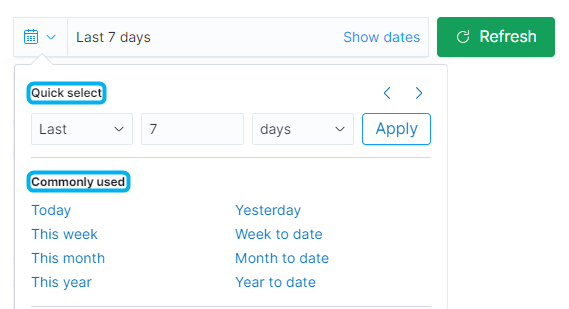
The 'Refresh' button refreshes the page to display the most up-to-the-second Portal data. It does not reset the user selected date range to the default date range.
Absolute, Relative, Now Date Range
1. Select Show Dates

2. Select "Absolute" or "Relative" for the start date per requirement
3. Select the beginning or ending date shown in the date range field
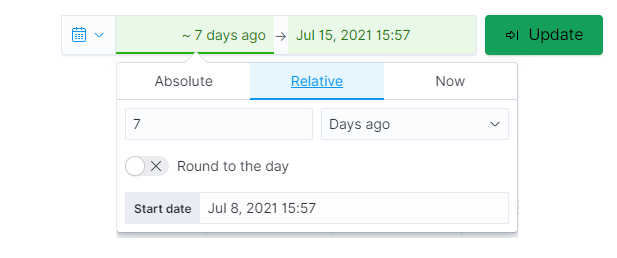
4. Select options of choice in the dropdown box
5. Select Update
'Now' can only be selected as an end date and is not a valid begin date option in the date selector.