
Allocated Percent Growth presents how much room the environments have available to grow.
1. In the left-hand Navigation menu, locate the Environments section
2. Select Instances or Databases
3. Page will default onto Overview page
The goal of the Top Events - Alerts table is to provide detailed insight into frequently occurring alerts.
In the Properties section, locate the Annual Data Growth card. This card will show you Allocated % Growth, as well as the Used % Growth for one, some, or all instances/databases within the desired timeframe.
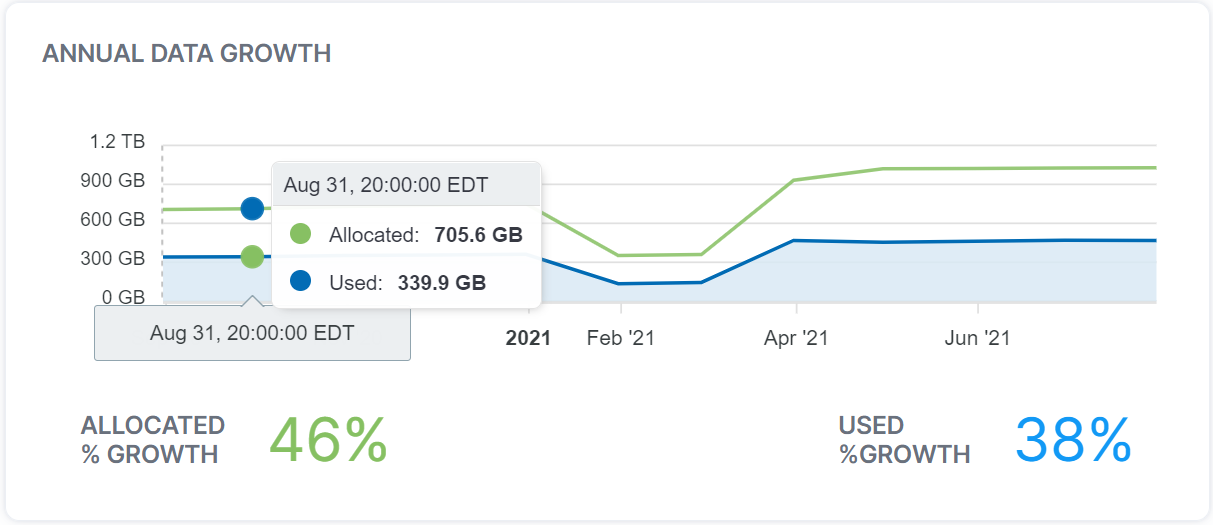
Tip: Hovering over a specific point in the graph, users can gain more insight into exact amounts.